Ads

Ads

Translate

Friday, 25 October 2013

Merubah warna editor Delphi Lazarus dan Smart mobile studio


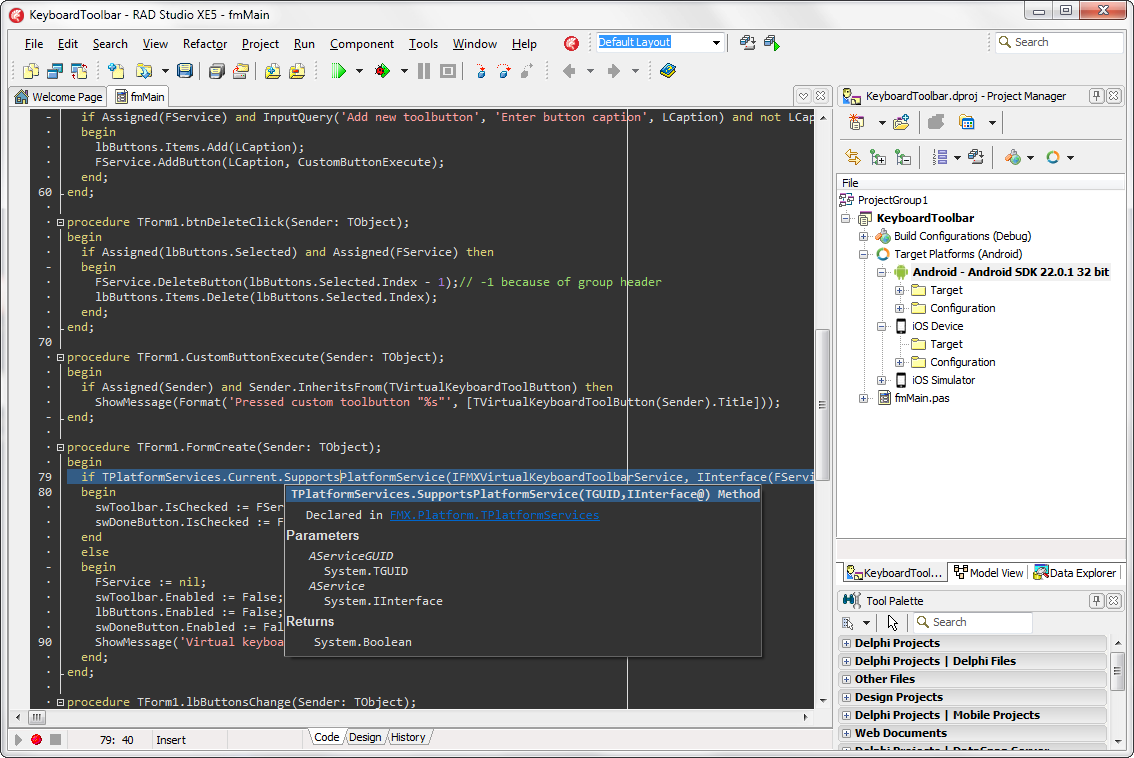
DITE yang disingkat juga sebagai Delphi IDE Tema Editor adalah tool yang dapat merubah warna editor untuk Delphi (RAD Studio), Lazarus IDE atau Smart Mobile Studio IDE.

DITE supports Delphi 5, 6, 7, 2005, BDS/Turbo 2006 and RAD Studio 2007, 2009, 2010, XE, XE2, XE3, XE4, XE5 , Lazarus v1.0.1.3 and Smart Mobile Studio IDE v1.1.2.17

Untuk mendownload silahkan Installer of the Delphi IDE Theme Editor

Klik untuk memperbesar

Klik untuk memperbesar

Klik untuk memperbesar

Klik untuk memperbesar

Klik untuk memperbesar


Thursday, 17 October 2013

Iklan Terjangkau di ITSTIMETOSHARE.BLOGSPOT.COM

Update Traffic
1 Hari pageview mencapai 500
dan benar2 berasal dari Google Searchengine


beriklan di itstimetoshares.blogspot.com
Trafic pengunjung yang lumayan banyak

Kebanyakan pengunjung mencari keyword tentang tekhnologi dan pemrograman

Support banyak webbrowser 

Tempat2 space iklan


Space No.1 Rp.30.000,-/Bulan
Space No.2 Rp.30.000,-/Bulan
Space No.3 Rp.20.000,-/Bulan
Space No.4 Rp.15.000,-/Bulan

Jika mau langsung pasang iklan di space no 1 dan 2 langsung hanya Rp. 50.000/Bulan

Contact saya langsung ./Fajar Priyadi - 0857-876-77544

Thursday, 3 October 2013

Install Raudus 0.9.6 on Lazarus IDE v.1.0.10

 ini adalah tutorial menginstal Raudus 0.9.6 di Lazarus IDE v.1.0.10

download raudus terlebih dahulu disini

http://www.raudus.com/cu-install/raudus-0.9.6-windows.exe

temen saya mendapati ada error saat proses penginstalan yaitu

(1,1) Fatal: Can not find RaudusFPC used by Lazarus, ppu=C:\Users\robby\Documents\Raudus\bin\fpc262\i386-win32\RaudusFPC.ppu, package RaudusFPC

cara mensolvednya ... arahkan ke path instalasi raudus ..... karena lazarus saya Lazarus IDE v.1.0.10 dan fpcnya 262 (cara mengetahui fpc ke bagian about lazarus) saya masuk ke path seperti di gambar dibawah ini :


jika sudah cari welding.exe ,,,
lalu jalankan welding.exe ... tunggu sampai selesai


kemudian klik RaudusFPC ... nanti muncul window instalasi ,, klik COMPILE lalu Use>Install


kemudian kita akan menginsal raudusnya ... lihat path di bawah ini klik raudusX lazarus package

akan muncul window instalasi , kemudan klik COMPILE kemudian jika sudah klik USE > INSTALL


selesai ...
Semoga berguna

Thursday, 26 September 2013

Memperbaiki Delphi 7 WinHelp


Fix Delphi 7 WinHelp


When you are installing Delphi 7 on Windows 7, the Help system inside Delphi 7 is not working. And this is the solution to fix it.

itulah englishnya, kalo indonesianya

Jika kamu menginstal Delphi 7 di Windows 7, sistem Help untuk Delphi 7 tidak berfungsi. Dan ini cara pemecahan masalahnya.


1. Go to Microsoft website to get the MS Update Fix.
here is the MS Update Fix for Winhelp

2. Download the update, and run it, start Delphi 7, and voila the Delphi 7 Help system is working now...


=============================

jika ada error dalam proses penginstalan silahkan ikuti proses inihttp://www.youtube.com/watch?v=YPAwpAXXKw8

Tuesday, 27 August 2013

My first Delphi Android app

One of the test programs I just built is an EditBox, ListBox, Button app (the same app that was the first used to launch Delphi version 1.0 and shown at the Software Development Conference in 1995 running on 16-bit Windows). Using three components and one line of code, I have the same app running on my Samsung Galaxy S4 phone.

To develop a FireMonkey Mobile App, you can start with a mobile application project template.  I chose the "Blank Application" template for my first app.


Next, I placed the 3 components on my main form.


I double clicked on the button to bring up the code editor and added the one line of code inside the Button’s onClick event handler to take the contents of the editbox and add the text as a new item to the listbox.


Finally, I selected Android as the target platform in the project manager and made sure the IDE was connected to my Samsung Galaxy S4 phone ("SCH-I545").


I hit the run button to build the application using our true native code Delphi ARM compiler for Android to create the APK file and deploy it to my Samsung Galaxy S4 phone. I added "Hello" and "world" text in the application and pressed the power and home buttons to grab the screen (I could have also used the Palm Swipe method to capture the screen).


What’s even cooler, the same code can be used with our Delphi true native code compilers for Intel and ARM to compile and run the same project on Windows, OSX and iOS.  All you have to do is set the target platform and use the same form and code.  With my PAServer running on my MacBook Pro, I configured my iOS Device target.

I hit the run button again to build the same application using our true native code Delphi ARM compiler for iOS and deploy it to my iPhone.


Going back to the Project Manager window, I activated the Win32 target and compiled the same app and ran it on my Windows virtual machine.

.

. .

Sneak Peek: Android SDK, NDK and Device Support in Delphi


A juicy sneak peek of the Android support in the SDK Manager and Project manager being developed in the beta. This video shows the updates to the SDK Manager to support the Android SDK & NDK. These can be installed and configured automatically, or you can install them on your own and configure them here. Then it shows how easy it is to add Android as a target. The project manager will automatically detect any Android Emulators or devices with USB debugging enabled and provide them as an option.


Why Some Mobile Apps are So Slow


If you haven’t read the lengthy article on Why Mobile Web Apps are So Slow I recommend you check it out. It appears well researched, citing lots of tests, sources, benchmarks and authorities. In summary JavaScript is garbage collected, and garbage collection introduces overhead making it up to 5x slower than native code. This isn’t such a big deal on x86 desktops, but with the slower architecture of ARM it is killing the performance of mobile apps.

Take a look at it, even if you just skim it you will no doubt learn something about this heated debate. Oh, and everywhere it talks about LLVM and ARC remember that is the same architecture that Delphi uses [PDF]  for iOS development (and Android soon too).

Also keep in mind that JavaScript isn’t the only garbage collected language on mobile devices. Languages that run on the Java Virtual Machine and .NET Framework are also garbage collected, as are most all scripting languages. This includes the Dalvik Virtual Machine that non-NDK Android apps run on. Granted Dalvik is optimized differently than that Java Virtual Machine, but it is still garbage collected, so it will still pause program execution at some point.

Quote from the article by Herb Sutter:

Managed languages made deliberate design tradeoffs to optimize for programmer productivity even when that was fundamentally in tension with, and at the expense of, performance efficiency…
Which was endorsed by Miguel de Icaza of Mono & Xamarin:

This is a pretty accurate statement on the difference of the mainstream VMs for managed languages (.NET, Java and Javascript). Designers of managed languages have chosen the path of safety over performance for their designs.
Points to remember:
  • Garbage collection is up to 5x slower than native code
  • This is a much bigger deal on ARM architecture than x86
  • Automatic Reference Counting (ARC) is not Garbage collection
  • Delphi uses LLVM architecture and supports ARC like Objective-C
Clarification: A big part of the slowdown is that JavaScript is also a dynamic language, so all garbage collected languages are not 5x slower than native code. There are pros and cons to GC and ARC. There is a comment on the article that points out the 5x comparison was between GC and manual memory management, not ARC. There is overhead with ARC, but it doesn’t pause your apps execution.

Read the article and draw your own conclusions, but I’d love to hear what you think.

From : http://delphi.org/2013/07/why-mobile-apps-web-are-so-slow/

Best Post This Year

Install Fortesreport community Delphi 7 dan RX Berlin

Download  Pertama2 kita harus punya file installernya terlebih dahulu, download  https://github.com/fortesinformatica/fortesrepo...

Total Pageviews

© 2014 Fajar Priyadi. WP themonic converted by Bloggertheme9. Published By Gooyaabi Templates | Powered By Blogger
TOP