Ads

Ads

Translate

Showing posts with label Delphi 7. Show all posts

Saturday, 29 June 2013

Video Tutorial Delphi 7 Indonesia - Membangun Aplikasi Database MS Access (Untuk Pemula sampai Mahir)


Sekiranya anda ingin mendownload, sudah saya sediakan link untuk download
silahkan DOWNLOAD VIDEO TUTORIAL DELPHI 7

TAG : Membangun Aplikasi Database MS Access (Untuk Pemula sampai Mahir) dengan delphi 7
Delphi 7 MS Access Video Tutorial Berbahasa Indonesia

Saturday, 5 January 2013

Component Barcode Untuk Delphi 7

Rekan-rekan pasti sudah tahu apa itu barcode....
Disini saya akan mengulas sedikit tentang barcode :


Barcode pada dasarnya adalah susunan garis vertikal hitam dan putih dengan ketebalan yang berbeda, sangat sederhana tetapi sangat berguna, dengan kegunaan untuk menyimpan data-data spesifik misalnya kode produksi, tanggal kadaluwarsa, nomor identitas dengan mudah dan murah, walaupun teknologi semacam itu terus berkembang dengan ditemukannya media magnetic, rfid, electronics tags, serial eeprom (seperti pada smart card), barcode terus bertahan dan masih memiliki kelebihan-kelebihan tertentu yaitu ,yang paling utama, murah dan mudah, sebab media yang digunakan adalah kertas dan tinta, sedangkan untuk membaca barcode ada begitu banyak pilihan di pasaran dengan harga yang relatif murah mulai dari yang berbentuk pena(wand), slot, scanner, sampai ke CCD dan bahkan kita dapat membuatnya sendiri. Jenis barcode sangatlah banyak mulai dari yang tradisional yaitu 1 dimensi sampai dengan barcode yang multi dimensi.

Nah pada kesempatan kali ini saya mencoba untuk berbagi sebuah Component untuk Borland C++ Builder 5, Borland C++ Builder 6, Borland Delphi 4, Borland Delphi 5, Borland Delphi 6, Borland Delphi 7 dan Borland Delphi 8. Yaitu Barcode freeware component.


galih library

galih library

Tertarik untuk mencoba Silahkan download dengan link di bawah ini :
sekian dan terima kasih.... selamat mencoba

Wednesday, 26 December 2012

Program Permainan Ular Tangga dengan Delphi 7

Ini lah game ular tangga yang dibuat oleh lunardz dan teman2 dalam rangka menyelesaikan tugas kuliah.... dengan animasi sederhana,,,,,, dan dengan koneksi database pada highscore saja....


DOWNLOAD

Download Source

Wednesday, 7 November 2012

Memasukkan file Flash Ke Delphi 7

Memasukkan file Flash Ke Delphi 7 Komponen – komponen standard pada Delphi 7 belum ada yang dikhususkan untuk memasukkan file animasi Flash dengan extensi file *.swf ke dalam area kerja Delphi 7.Untuk itu perlu dilakukan import ActiveX Controll. Caranya adalah sebagai berikut :

Buka Delphi 7 kemudian buka tab component  import active control… Silakan pilih Shockwave Flash (Version 1. 0) kemudian klik pada tombol Install... yang ada di bawah pilihan tersebut sehingga muncul kotak dialog instalisasi sebagai  berikut

Untuk Selengkapnya silahkan Download Ebooknya disini : DOWNLOAD

Kumpulan Kode-kode pada Delphi 7.0

Kode progresbar pada Delphi
Kode pembelian pada Delphi
Membuat loding pada Delphi
Kode membuat aplikasi winamp dengan Delphi……

Download Ebooknya disini : DOWNLOAD

Mengakses database dengan Delphi 7.0 Microsoft Access


Dalam tulisan ini akan dijelaskan secara ringkas mengenai cara pengaksesan database yang dibuat
dengan Microsoft Acces yang kemudian data tersebut diolah/dimodifikasi dengan menggunakan
program Borland Delphi 7.0. Program yang dibuat terbatas pada menampilkan membuat database,
pembuatan program database, membaca database, menghapus database.

Pendahuluan

Database adalah sekumpulan data yang disusun sedemikian rupa sehingga mampu menghasilkan
sebuah informasi yang informatif bagi penggunanya.

Proses Pembuatan Program

Buat database dengan Ms Access dengan nama “Proyek Akhir.mdb”
1. Buka Ms Acces


Dengan field-field sebagai berikut:
No Nama Filed
Data type

1

Nama
Mahasiswa
NIM

2

3

Jurusan

4

Kelas

Text

Text

Text

Text

Properties

Field Size

Field Size

Field Size

Field Size

Value

25

12

20

2

Karena tutorialnya terlalu panjanga maka silahkan download ebooknya : DOWNLOAD

Mengakses Database pada Delphi dengan ADO


Pendahuluan

Bahasa pemrograman Delphi dapat digunakan untuk berbagai keperluan baik untuk
perhitungan matematis, aplikasi perkantoran, aplikasi multimedia, pembuatan aplikasi pengolah,
aplikasi kontrol industri sampai kepada aplikasi database. Pada materi ini akan dijelaskan bagaimana
cara mengakses database MS Acces dalam Delphi menggunakan Komponen ADO.
Mungkin anda pernah atau bahkan sering mengembangkan program database dengan Delphi
atau Visual Basic. Anda dapat menggunakan database paradox, dbase maupun MS Acces, dan
mungkin anda mengalami masalah dalam distribusi file yang anda bangun mempunyai ukuran yang
sangat besar karena anda harus menyertakan file database beserta kelengkapannya. Hal ini tentu tidak
menguntungkan terutama jika harus mendistribusikannya lewat email.
Disini akan dibahahas tentang aplikasi database dengan bahasa pemrograman Delphi. Untuk
mengakses database dalam MS Acces, mulai Delphi 5 telah menyediakan komponen ADO yang akan
memudahkan dalam mengelola database yang akan kita bangun. Dengan ADO pada Delphi distribusi
program hanya membutuhkan file exe dan database-nya (*.mdb) saja. Tentu ini untuk program yang
sederhana. Sehingga anda dapat mendistribusikannya dengan mudah.
Memulai Program database Dengan Delphi
Delphi telah menyediakan komponen database yang akan memudahkan kita dalam merancang
dan membangun aplikasi database. Komponen-komponen database dikelompokkan dalam
Component Pallete Data Acces Data Control dan BDE Serta ADO seperti pada gambar dibawah
ini.

 Data Acces dan BDE banyak  berperan pada penentuan sumber data seperti tabel, SQL, query
maupun koneksivitasnya. Contoh komponen ini yaitu Table dan Datasource.

 Data Control lebih menekankan pada pengaturan data yang terpasang pada aplikasi sepeti
DBLabel, DBNavigator, DBGrid, DBImage, DBMemo, DBEdit, DBCombobox dan lain
sebagainya.

 ADO digunakan untuk komunikasi Program dengan Database MS Acces sehingga data yang
dibuat dengan MS Acces akan dapat diintegrasikan dengan Delphi
Latihan 1. Membuat Program database Dengan Delphi
Untuk membuat program database dengan Delphi, sebelumnya anda harus membuat database dalam
MS Acces terlebih dahulu.

Contoh database dalam MS. Acces dengan Nama pemasaran yang berisi 4 tabel dengan nama Dosen,
Mahasiswa, Nilai dan T_Kuliah
Buatlah Form dalam Delphi dan berilah komponen-komponen seperti terlihat pada gambar berikut :
Daftar Komponen Yang Digunakan

 ADO Connection Ada Di Pallete ADO
 ADOTable Ada di Pallete ADO
 DataSource Ada di Pallete Data Acces
 DBNavigator Ada di Pallete Data Control

Karena terlalu panjang maka silahkan download versi Ebook nya saja, silahkan dapat di download disini : DOWNLOAD

MEMBANGUN APLIKASI SMS GATEWAY DENGAN DELPHI 7


Modul ini berisi tentang tata cara pembuatan aplikasi sms gateway menggunakan Borland Delphi 7 serta pembuatan databasenya menggunakan MySQL, walaupun pada modul ini Delphi yang dipakai versi 7, tapi tidak jauh berbeda caranya ketika kita mempraktikan pada Delphi versi 5, 6 atau pada Delphi versi lebih tinggi. Akhir kata semoga dapat bermanfaat dan jangan pernah bosan untuk belajar! 


1. Pendahuluan 
- SMS Gateway : merupakan komunikasi dua arah, mengirim dan menerima, digunakan 
untuk SMS keyword, polling, ataupun informasi lainnya. 
2. Software Yang Harus Di Persiapkan 
- MySQL versi 5, dapat diinstall dengan paket software XAMPP (Apache MySQL PHP 
Perl) disarankan versi 1.7.2 ke atas, atau bisa anda diinstall memakai paket software yang 
lain seperti AppServ , PHPTriad, ataupun WAMP. 
- Borland Delphi 7 atau versi lebih tinggi (Sebagai Program Aplikasi)
- Gammu : Tools aplikasi sms gateway, dapat di unduh di www.wammu.eu . Gammu 
yang dipakai pada modul ini adalah versi: Gammu 1.29.92 
- Zeoslib: seperangkat komponen database untuk 
MySQL, PostgreSQL,Interbase, Firebird, MS SQL, Sybase, Oracle dan SQLite untuk 
Delphi, FreePascal/Lazarus, Kylix dan C Builder. Dapat di unduh di http://zeos.firmos.at


3. Konfigurasi Gammu
- Spesifikasi Gammu dan Modem Yang Dipakai
Versi Gammu: Gammu 1.29.92 
Modem: Modem SMS Gateway “Wavecom”  
- Konfigurasi Gammu
- Copykan file gammurc & smsdrc dari: 
C:\Program Files\Gammu 1.29.92\share\doc\gammu\ examples\config  
Ke: C:\Program Files\gammu\bin\ 
- Dengan menggunakan notepad,atur file gammurc yang ada pada : 
C:\Program Files\gammu\bin\gammurc  
device = com23: 
connection = at115200  
- Dengan menggunakan notepad,atur file smsdrc yang ada pada : 
C:\Program Files\gammu\bin\smsdrc  
device = com23: 
connection = at115200 
Service=MYSQL 
user = root 
password =  
pc = localhost  
database = sms


- Langkah selanjutnya, untuk mengecek bahwa gammu dan modem wavecom sudah jalan, 
coba buka cmd (command prompt) 
- Kemudian masuk ke: 
- Tes Kirim SMS
- Menjalankan Service Gammu
Langkah selanjutnya, setelah service gammu aktif, coba uji dengan mengirim sms ke 
nomor yang telah dimasukan di modem dengan format yang telah disetting pada trigger 
yang dibuat.  


4. Pembuatan Database sms di MySQL
- Buka database MySQL melalui phpMyAdmin  ataupun melalui tools GUI MySQL 
lainnya, kemudian buatlah database sms : create database sms;
- Untuk pembuatan tabel-tabelnya kita tidak akan merancang dari awal karena akan 
mengimport dari file mysql.sql bawaan dari installasi gammu. Kalau gammu nya kita 
install di C biasanya secara default ada di : 

Karena terlalu Panjang ,,, maka silahkan download bacaannya yang sudah terangkum di dalam ebook saja ya
silahkan download disini : DOWNLOAD


Thursday, 1 November 2012

Delphi 7 Update 1


Disini saya mencoba berbagi Update Delphi 7
silahkan disedot .... Maaf Jika tidak berkenan link saya bungkus dengan adf.ly


Semoga bermanfaat ......

UPDATE

Delphi 7.1 Update 
Release Notes

=======================================================

This file contains important supplemental and late-breaking
information that may not appear in the main product
documentation, and supersedes information contained in other
documents, including previously installed release notes.
Borland recommends that you read this file in its entirety.

NOTE:  If you are updating a localized version of Delphi 7,
       visit the Borland Registered User web site to obtain a
       localized readme file that may contain important late-
       breaking information not included in this readme file.

IMPORTANT:  Delphi must be closed before installing this
            update.            
            
=====================================================

CONTENTS

 * INSTALLING THIS UPDATE
 * UPDATING LOCALIZED VERSIONS OF DELPHI 7
 * KNOWN ISSUES 
 * ISSUES ADDRESSED BY THIS UPDATE
   - IDE
   - CORE DATABASE
   - DATASNAP
   - DBGO (ADO COMPONENTS)
   - dbExpress
     - dbExpress COMPONENTS AND DB VCL
     - dbExpress CORE DRIVER AND METADATA
     - dbExpress VENDOR ISSUES
     - dbExpress CERTIFICATION
   - WEB SNAP
   - ACTIVEX
   - COMPILER
   - RTL
   - VCL
   - THIRD PARTY - BOLD FOR DELPHI
 * VERIFYING THAT THE UPDATE WAS SUCCESSFUL  
 * FILES INSTALLED BY THIS UPDATE
  
=======================================================

INSTALLING THIS UPDATE

* This update can not be applied to Delphi 7 Architect Trial
  version.
  
* This update can not be removed after it is installed.

* You will need the original Delphi 7 installation CD available
  to install this update.

* To install this update from the CD, insert the CD, and launch
  the d7_ent_upd1.exe file appropriate for your locale.

* To install this update from the Web, double-click the 
  self-executing installation file and follow the prompts.
  
* The Delphi 7 documentation PDF files are available on
  the update CD.

========================================================

UPDATING LOCALIZED VERSIONS OF DELPHI 7

* This update can be applied only to the English version of
  Delphi 7. There are separate updates for the German, French
  and Japanese versions of Delphi 7.
 
* This update provides new localized versions of the SqlConst
  files. After installing the update, backup and delete the
  following files from the Delphi 7 installation folder:
  
  Lib\Debug\SqlConst.dcu
  Lib\SqlConst.dcu
  Source\Vcl\SqlConst.pas
  
  and then remove the appropriate locale extension (.de, .fr, or
  .jp) from the new SqlConst files in the same folders. For
  example, for the French version of Delphi, rename
  SqlConst.dcu.fr to SqlConst.dcu.
  
========================================================

KNOWN ISSUES

* dbExpress driver - After installing this update, the
  dbxdrivers.ini file will not contain an entry for MSSQL=1. If
  you require that entry, please edit the ini file manually
  after installing the update.  By default, dbxdrivers.ini is
  located at C:\Program Files\Common Files\Borland
  Shared\DBExpress.
  
* If you have updated any Borland packages in the system32
  directory with unofficial patches or updates from CodeCentral,
  MSI might revert (auto-repair) those packages to their
  previous version during installation of this update.
  Therefore, after installing this update, you may need to 
  re-install unofficial patches or updates.
  
* Due to a Windows Help engine limitation on Windows 98 and
  Millennium, the Help system Index tab will be empty if the
  index exceeds 32,767 keywords. 
  
  If you encounter an empty Help Index tab after installing this
  update, open the d7.ohi file in the Delphi7\Help folder and
  comment out one or more of the index entries by changing the
  colon in column one to a semi-colon, as shown here:
  
  ;Index Open Tools API (IOTA)=d7iota.hlp

  Save the d7.ohi file and delete any hidden *.GID files in your
  Delphi7/Help folder before restarting the Help.  
  
  This modification reduces the number of index keywords, but
  does not affect other Help system functionality, such as
  cross-file linking or F1 accessibility.
      
========================================================

ISSUES ADDRESSED BY THIS UPDATE

This readme lists the maintenance for all editions of Delphi 7;
not all of the features mentioned in this file are available in
all editions of the product.

This update resolves the following issues:

IDE

* Using the up/down arrow keys to navigate and select items from
  the Code Completion window sometimes skips items (Quality
  Central 2875).
  
* In the Project Manager, units are incorrectly displayed in the
  order that they are listed in the USES clause, rather than
  alphabetically.
  
* Using collections containing component references and form
  inheritance can result in incorrect references being stored in
  the dfm file.

=======================================================
  
CORE DATABASE

* TFMTBCDField initializes to size 8 instead of size 4, allowing 
  the system to initialize precision to 7 and size to 8 
  (Quality Central 5938).
  
* Using a TDBLookupComboBox to display a list of data given
  by a detail TQuery results in the error "Field '' not found"
  (Quality Central 5384 and 4823).
  
* TDBRadioGroup maintains its focus on the most recently
  selected item, even after an edit has been canceled
  (Quality Central 2109).
  
=======================================================

DATASNAP

* After deleting a row from a TClientDataset, sometimes the
  delta dataset still contains a record.  This happens if you
  populate the Nested Dataset field before populating another
  field that precedes it in the field order.
  
* The TClientDataSet.ApplyUpdates method fails if the dataset 
  contains only changes to fields that have the 
  ProviderFlags.pfnUpdate property set to False 
  (Quality Central 2338).
  
* TClientDataSet does not order correctly on a TLargeIntField 
  when used in an index or in the IndexFieldNames property 
  (Quality Central 1050 & 2626)
  
* TAggregateField returns an incorrect value after a 
  filter was used and then cleared (Quality Central 1712).
 
* A "Key violation" exception may incorrectly be generated
  when using poFetchDetailsOnDemand with a nested dataset that
  also has an InternalCalc field (Quality Central 2011).
  
* TClientDataSet may contain invalid Delta entries when using 
  poPropogateChanges. (Quality Central 2019 & 2333).
  
* Editing the value of an InternalCalc field on a nested 
  TClientDataset causes the ChangeCount property of the 
  parent dataset to increase (Quality Central 2027).
  
* A TLargeIntField cannot be used as a linking field in a 
  master/detail relationship.  Doing so results in the 
  error "Cannot access field  as type variant."
  
* TClientDataSet doesn't save data to file when FileName is 
  set and there is no existing file on disk 
  (Quality Central 2307).
  
* Using the Delphi 7 version of midas.dll to open an XML file
  that was saved with the Delphi 6 version of midas.dll results
  in an illegal operation.
  
* Incorrect filter expression parsing occurs when parsing a
  value that contains a quote in TClientDataSet. The expression
  parser incorrectly treats the rest of the expression as a
  formula (Quality Central 1266). 
  
* TClientDataSet.ChangeCount will return an incorrect value 
  when editing the value of a TStringField or a 
  TWideStringField and then reverting it to the original value 
  (Quality Central 2717 & 4508).
  
* Canceling an update to an individual field by assigning the
  "unassigned" (varEmpty) value to TField.NewValue in the
  TDataSetProvider.BeforeUpdateRecord event handler does not
  work (Quality Central 3660).
  
* TClientDataset InternalCalc fields are reset to null after 
  calling the ApplyUpdates method when using 
  poPropogateChanges (Quality Central 3777).
  
* When using incremental fetching on a TClientDataset with 
  parameters, the associated TDatasetProvider will repeatedly 
  return the same set of records (Quality Central 3515).
  
* TClientDataset.FindKey will fail with an list index error
  when used on a cloned nested dataset (Quality Central 3786).
  
* When the size of a Persistent field in TClientDataSet is set
  too large, it overwrites neighboring fields upon Post 
  (Quality Central 3974).
  
* TDataSetProvider generates incorrect SQL in response to a 
  RefreshRecord request in some cases and fails to update 
  all fields properly (Quality Central 4014).
  
* When TDataSetProvider obtains the DB 'current' values 
  after an update conflict, it does so against the wrong
  fields (Quality Central 4006).
  
* TClientDataSet.Delete fails with the error "Cannot
  delete master record with details" even when all of the
  details are deleted if the detail table was previously
  cloned (Quality Central 5646).
 
* In some cases, records may disappear from a nested 
  TClientDataset after performing edits, applying updates 
  and calling refresh (Quality Central 7287).
  
* When multiple indexes are included with the data from a 
  provider, the IndexDef entries in the TClientDataset 
  will show duplicate 'Fields' and 'DescFields' values 
  (Quality Central 7543).
  
* When updating blob fields in a TClientDataset with the 
  LogChanges property set to False, blob data is lost 
  from other unrelated records (Quality Central 6591).
  
* Using a Filter or Locate with a TLargeIntField on a 
  TClientDataSet will always fail with the error 
  "Constant is not correct type". 
  (Quality Central 6142 & 3496).
  
* Calling the CancelRange method on nested TClientDataset 
  will cause all records for every master record to be 
  displayed (Quality Central 4301).
  
* When using RefreshRecord on a Memo or Blobfield and the field
  has been modified by another user, the blobsize of that field
  does not change if it is less than before (Quality Central 4676).

* Calling the TClientDataset.Locate method on a TWordField 
  always returns false (Quality Central 5319).

* Using the TDataSetProvider poFetchDetailsOnDemand option 
  with a server-side master/detail definition (nested dataset 
  on the client side) raises an exception when the master
  TClientDataset is opened (Quality Central 5707).

* TClientDataset may create an incorrect delta when inserting
  new master and detail records and then editing the same 
  master record a second time (Quality Central 6849).
  
* The assignment of a LargeInt field to another LargeInt field
  fails when the destination and source are both TLargeIntFields
  (Quality Central 6393).

* When Params are passed from a TClientDataSet to a 
  TDatasetProvider, the Size,Precision, and NumericScale property 
  settings are lost (Quality Central 6308).
  
* TClientDataSet allocates values against nested dataset 
  AutoInc fields but it should not (Quality Central 5509).

* When using a TimeStamp type parameter with a TClientDataSet an
  error occurs when the parameter is passed to the server
  (Quality Central 6372). 
  
* Setting MTSDataModule.AutoComplete to False in the IDE is
  overridden and set back to True at run time (Quality Central
  4716).

* Calls to ApplyUpdates(-1) on a TMTSDataModule do not work
  properly (Quality Central 6906).
  
=======================================================

DBGO (ADO Components)

* Using TParameter.Assign(TParam) or TParam.Assign(TParameter)
  causes incorrect settings of the Size, NumericScale, and
  Precision properties (Quality Central 6366).
  
* When values in persistent TMemoFields are returned after
  reading a row of a TADOTable, the values are truncated at the
  first occurrence of #0 (Quality Central 2771).
  
* When using TADOQuery to get a result set from a SQL query, the
  SQL statement gets prepared but never gets unprepared
  Quality Central 3635).
  
* With a query, when using cursorType set to ctOpenForwardOnly
  and cursorLocation set to clUseServer, the "First" method will
  move the cursor position to the second record (Quality Central
  4769).
    
* Setting the value of a TLargeInt field to a negative value in
  an ADODataSet and calling Post results in the error "Multiple-
  step operation generated errors. Check each status value"
  (Quality Central 2106).
  
* When using a SQL Server 2000 table with a BigInt or decimal 
  columns, negative values are incorrectly returned as positive 
  values by ADO components (Quality Central 2379 & 998).

=======================================================

dbExpress COMPONENTS

* When including the line delimiter ";" at the end of a select
  statement in TSQLQuery, then using the query and a
  TDataProvider to give data to a CDS, you cannot apply updates
  without encountering a the syntax error "Token unknown."

* Updating on a TSQLQuery with  either a WHERE clause or when
  adding a delimiter ";" results in the error "Unable to find
  record, no key specified."
  
* When using TSQLConnection and TSimpleDataSet to access a MySQL
  database, it is impossible to add new records to a table that
  has an auto-increment primary key (Quality Central 5465).
  
* When using the MySql driver, erroneous state information about
  the number of active statements with respect to a
  TSQLConnection might result in a transaction starting on one
  connection and a commit or rollback happening on another
  connection (Quality Central 1074).
  
* Updating on TSQLQuery with either a WHERE clause or when adding a
  delimiter ";" results in the error "Unable to find record, no
  key specified" (Quality Central 5550).
  
* When using TSQLQuery to add calculated fields, OnCalcFields
  fails on the first record, because all of the fields in the
  first record are empty after OnCalcFields is called (Quality
  Central 1328).
  
* Calling TSQLConnection.getTableNames() to retrieve system
  tables takes too long.

* Using TSQLConnection.CloneConnection may result in the loss of
  the TableScope status for a new connection (Quality Central
  5867).

=======================================================

dbExpress CORE DRIVER AND METADATA

* DB2 V8 Support - Index Metadata retrieval:  (Quality Central
  4150) Querying for a table with a unique index fails with
  "Cannot convert a variant of type (Null) to type (String)"

* DB2 V8 Support - Fetching a stored procedure parameter fails.

* MySQL 4.0.x support (Quality Central 3731).

* MySQL driver supports only the default Port (Quality Central 3736).

* MySQL SQLCommand.GetRowsAffected returns 0 on successful
  updates (Quality Central 4504).

* MySQL TimeStamp comes back as NOT NULL always (Quality
  Central 4689).

* MySQL metadata causing data truncation (Quality Central
  4160).

* AV on SQLCommand.Close() in MySQL driver (Quality Central
  5819).

* MySQL metadata is retrieved from wrong database (Quality
  Central 4130).

* An MSSQL stored procedure with long names causes memory
  corruption (Quality Central 3225).

* The MSSQL driver leaks resources on repeated SQL execution 
  (Quality Central 4059).

* MSSQL TimeStamp fraction part rounding error while fetching
  data.

* MSSQL - ExecDirect() does not return the RowsAffected.

* MSSQL return parameter is not available from a stored
  procedure returning cursor/cursors (Quality Central 3763).

* An MSSQL stored procedure with no parameters causes memory
  corruption.

* An MSSQL stored procedure does not return @@IDENTITY after a
  SP execution. The identity value is returned only on the third
  execution.

* ORACLE Functions are now supported (Quality Central 4051).

* ORACLE SQLCommand.getParameter() always returns the NULL
  indicator as True (Quality Central 4018).

* InterBase - Support for BOOLEAN data type has been added.

=======================================================

dbExpress VENDOR ISSUES

* MySQL -  Data truncation resulted as the cursor level metadata
  is incorrect. MySQLField.length is 1024 for the second columns
  after describing the SQL "Show create table tablename".  -
  (Quality Central 1810)

* MSSQL - SubQuery parameter binding causes an AV in MSVCRT7.DLL
  (Quality Central 2767) - MS bug. Case # SRX030728604937.

* MSSQL Null parameter binding on a NOT NULL INTEGER columns
  fails with a SQL Error "SQL State:HY000, SQLError Code:0
  Invalid input parameter values" - MS bug Case
  #SRX030728605044. dbExpress MSSQL driver calls
  IDBCommand.Prepare() and that seems to cause this bug in
  SQLOLEDB.DLL.

=======================================================

dbExpress CERTIFICATION

dbExpress has been certified with the following database
versions:

InterBase 7.1  (*Driver should also work with InterBase 6.5, 7.0)
Oracle 9.1.0   (*Driver should also work with ORACLE 9.2.0)
DB2 UDB 8.x    (*Driver should also work with DB2 V7)
MSSQL 2000
Informix 9.x
MySQL 4.0.18

 * The driver should work with these database versions, however,
   it has not been fully certified with these versions.
  
=======================================================

INTERNET/WEBSNAP

* Procedure TSockWebResponse.SendResponse contains code that
  causes an incomplete response.  
 
=======================================================

ACTIVEX

* On Windows 98 SE, registering an OLE-server on a a shared
  mapped drive and then starting the program from a non-UNC path
  drive results in an endless loop (Quality Central 3151).
  
* ShortToLongFileName fails on some UNC paths, which makes TComServer
  fail when the executable is located on a remote computer
  (Quality Central 3049).
  
* Additional methods begin with GhostMethod_ are added to
  interface declarations which would not appear in Delphi 6
  (Quality Central 3426).
  
* SetOlePicture distorts the target TPicture size (Quality
  Central 4137).

=======================================================
 
COMPILER

* Assigning a partially empty multi-dimensional dynamic array to
  a variant causes an access violation.
  
* Converting an empty dynamic array to a variant array results
  in a non-empty variant array with the wrong bounds.
  
* Assert fails to break and leaves an FPU invalid op exception set
  (Quality Central 5248).
  
* Under some circumstances, optimization causes an access
  violation on a call to a dynamic + safecall method (Quality
  Central 5071). 
   
=======================================================

RTL

* In System.pas, function LoadResString(ResStringRec:
  PResStringRec): string; has a hard-coded buffer of 1024
  characters, which causes resource string table entries in
  excess of 1023 characters to be truncated (Quality Central
  7851).
  
* On Windows Server 2003, calls to SysUtils.GetEnvironmentVariable
  fail with an access violation wHen the requested
  environment variable does not exist (Quality Central 4319).
  
* When a variant array item is a string with embedded null
  characters (#0), Delphi treats those items as null-terminated
  strings when the string is assigned to an item of variant
  array (Quality Central 6078).
  
=======================================================

VCL

* Context and keyword help does not fire for the OnHelp events.

* Selecting a zero length (empty) item in drop-down combo box
  results in an access violation in ntdll.dll.
  
* Attempting to delete a single item from the TComboBoxEx ItemEx
  list, that item and the next item are deleted (Quality Central
  3991).
  
* Calling TBitmap.Assign(nil) may result in a GDI resource leak
  (Quality Central 2511).
  
* TRegistry class leaks a register key handle if LazyWrite is set to
  False.
  
* THashedStringList ignores the NameValueSeparator property
  (Quality Central 5632).
  
* In a DBCS environment, an exe filename that includes DBCS
  characters often garbles Application.Title (Quality Central
  5089).
  
* Menu items and images are sometimes drawn partially in black
  on Windows XP systems that have themes disabled (Quality Central
  2341).
  
* When the ValueListEditor Visible property is set to False, making
  it visible and adding a string at runtime may cause an access
  violation (Quality Central 4953).
  
* When connected to a network printer and the system hosting the
  network printer is offline, Printer.PageWidth may cause an
  access violation in GDI32.DLL (Quality Central 757).

* The OldCreateOrder property for a form that inherits from
  another form is automatically set to True when the form is
  saved (Quality Central 1675).
  
* When ending a Windows session (either by using Log Off or Shut
  Down) while a VCL-based Delphi application is running, no
  OnDestroy events on the application's forms are called, nor
  are any finalization sections executed. This may result in
  lost data and user settings (Quality Central 5332).
  
=======================================================
  
THIRD PARTY - BOLD FOR DELPHI

* SQLDatabaseConfig now contains settings for database evolution
  scripts (separator, terminator and commands for transaction
  start/commit). Logs can be saved from the evolution dialog
  (Quality Central 4679).
  
* BoldSelectChangeAction in BoldComboBox is now triggered more
  appropriately on incremental searches (Quality Central 2827).

* A potential infinite recursion problem in
  TBoldUnOrderedIndexableList.KnowsSupportsNil has been fixed.

* An assert with side-effects in TBoldObjectList.GetBoldObject
  has been changed. This affects debug dcus only.

* TBoldUMLModelValidator.ValidateClass no longer has a bad format
  string for one error. 

* TBoldDbDataValidator.Validate no longer validates without
  running any tests when not connected to a database.

* DBDataValidation no longer fails on parent or child mapped
  classes. 

* Performance of XMI Import has been improved (Quality Central 2827) .

* XMI Export now correctly exports multiplicity 0..n.
 
* Transaction grouping in optimistic locking has been improved
  by performing checks in the same transaction as the update
  (Quality Central 3123).

* A memory leak in the Object Lending Library has been fixed
  (Quality Central 3648).

* Several issues with BoldGrid and goTabs have been resolved
  (Quality Central 3903 and 3904).

* Saving modified multilinks no longer yields an index out of
  bounds condition under certain conditions (Quality Central
  4870).

* BoldSystemDebuggerForm no longer yields an access violation on
  the second invocation from a Bold Action (Quality Central
  6482).

* Certain combinations of tableMapping=Child and abstract
  classes have been improved (Quality Central 7110).

* The OCL operation includesAll no longer returns false when it
  should return true (Quality Central 3146).

* An Import problem with "Error: Class is already a relation class for
  another association" has been fixed (Quality Central 3093).

* TBoldEnvironmentConfiguration.DeactivateQueue no longer yields
  an access violation during finalization (Quality Central
  3227).

* An access violation in BoldMemoryManager during finalization
  of multi-threaded applications has been fixed.

* Model validation no longer incorrectly warns against parent
  mapped classes with derived attributes not allowing null.

* Relating objects belonging to different Bold systems is no
  longer allowed.

* Instructions for compiling IDL files have been improved.
  
=======================================================

VERIFYING THAT THE UPDATE WAS SUCCESSFUL

The final dialog of the update installer indicates whether the
update was successful. You can also:

* Open Delphi 7 and use "Help | About" to display the About Box.
  The product version should be:
  
  Version 7.0 (Build 8.1)
  
  (Before applying the update, the version is 7.0 (Build 4.453).) 

* Use the file list in "FILES INSTALLED BY THIS UPDATE" below to
  verify that the correct file versions are installed on your
  machine.
  
=======================================================

FILES INSTALLED BY THIS UPDATE

This update adds or updates the following Delphi files. The
following list includes files for all editions of Delphi.
By default, <InstallDir> is C:\Program Files\Delphi7.

Version          Path and File Name
-------          ------------------
7.0.8.1          <InstallDir>\bin\coreide70.bpl
7.1.1523.17956   <InstallDir>\bin\dbexpdb2.dll
7.1.1523.17956   <InstallDir>\bin\dbexpInf.dll
7.1.1523.17956   <InstallDir>\bin\dbexpInt.dll
7.1.1523.17956   <InstallDir>\bin\dbexpmss.dll
7.1.1523.17956   <InstallDir>\bin\dbexpmysql.dll
7.1.1692.666     <InstallDir>\bin\dbexpora.dll
7.0.8.1          <InstallDir>\bin\dcc32.exe
7.0.8.1          <InstallDir>\bin\dcc70.dll
7.0.8.1          <InstallDir>\bin\dclclxdb70.bpl
7.0.8.1          <InstallDir>\bin\dcldb70.bpl
7.0.8.1          <InstallDir>\bin\dcldbx70.bpl
7.0.8.1          <InstallDir>\bin\delphi32.exe
7.0.8.1          <InstallDir>\bin\designide70.bpl
7.0.8.1          <InstallDir>\bin\dfm70.bpl
7.0.8.1          <InstallDir>\bin\orbpas45.dll
7.0.8.1          <InstallDir>\bin\tlib70.bpl

7.0.8.1          <InstallDir>\Debugger\DCC70.dll
                 
                 <InstallDir>\lib\idl45\corba.dcu
                 <InstallDir>\lib\ADODB.dcu
                 <InstallDir>\lib\adortl.dcp
                 <InstallDir>\lib\axctrls.dcu
                 <InstallDir>\lib\comctrls.dcu
                 <InstallDir>\lib\ComServ.dcu 
                 <InstallDir>\lib\DB.dcu
                 <InstallDir>\lib\DBClient.dcu
                 <InstallDir>\lib\DBCommon.dcu
                 <InstallDir>\lib\DBCtrls.dcu
                 <InstallDir>\lib\dbExpDB2.dcu
                 <InstallDir>\lib\dbExpINT.dcu
                 <InstallDir>\lib\dbExpMySQL.dcu
                 <InstallDir>\lib\dbExpORA.dcu
                 <InstallDir>\lib\dbexpress.dcp
                 <InstallDir>\lib\dbrtl.dcp
                 <InstallDir>\lib\DBXpress.dcu
                 <InstallDir>\lib\dsnap.dcp
                 <InstallDir>\lib\dsnapcon.dcp
                 <InstallDir>\lib\Forms.dcu
                 <InstallDir>\lib\graphics.dcu
                 <InstallDir>\lib\IniFiles.dcu
                 <InstallDir>\lib\menus.dcu
                 <InstallDir>\lib\MidasLib.dcu
                 <InstallDir>\lib\MtsRdm.dcu
                 <InstallDir>\lib\Printers.dcu 
                 <InstallDir>\lib\Provider.dcu
                 <InstallDir>\lib\registry.dcu
                 <InstallDir>\lib\rtl.dcp
                 <InstallDir>\lib\SqlConst.dcu
                 <InstallDir>\lib\SqlConst.dcu.de
                 <InstallDir>\lib\SqlConst.dcu.fr
                 <InstallDir>\lib\SqlConst.dcu.jp
                 <InstallDir>\lib\SqlExpr.dcu
                 <InstallDir>\lib\StdCtrls.dcu
                 <InstallDir>\lib\system.dcu
                 <InstallDir>\lib\sysutils.dcu
                 <InstallDir>\lib\ValEdit.dcu
                 <InstallDir>\lib\Variants.dcu 
                 <InstallDir>\lib\vcl.dcp
                 <InstallDir>\lib\vcldb.dcp
 
                 <InstallDir>\lib\debug\ADODB.dcu
                 <InstallDir>\lib\debug\axctrls.dcu
                 <InstallDir>\lib\debug\comctrls.dcu
                 <InstallDir>\lib\debug\comserv.dcu
                 <InstallDir>\lib\debug\DB.dcu
                 <InstallDir>\lib\debug\DBClient.dcu
                 <InstallDir>\lib\debug\DBCommon.dcu
                 <InstallDir>\lib\debug\DBCtrls.dcu
                 <InstallDir>\lib\debug\DBXpress.dcu
                 <InstallDir>\lib\debug\Forms.dcu
                 <InstallDir>\lib\debug\graphics.dcu
                 <InstallDir>\lib\debug\inifiles.dcu
                 <InstallDir>\lib\debug\menus.dcu
                 <InstallDir>\lib\debug\MtsRdm.dcu
                 <InstallDir>\lib\debug\printers.dcu
                 <InstallDir>\lib\debug\Provider.dcu
                 <InstallDir>\lib\debug\registry.dcu
                 <InstallDir>\lib\debug\SqlConst.dcu
                 <InstallDir>\lib\debug\SqlConst.dcu.de
                 <InstallDir>\lib\debug\SqlConst.dcu.fr
                 <InstallDir>\lib\debug\SqlConst.dcu.jp
                 <InstallDir>\lib\debug\SqlExpr.dcu
                 <InstallDir>\lib\debug\stdctrls.dcu
                 <InstallDir>\lib\debug\system.dcu
                 <InstallDir>\lib\debug\sysutils.dcu
                 <InstallDir>\lib\debug\ValEdit.dcu
                 <InstallDir>\lib\debug\variants.dcu
                 <InstallDir>\lib\debug\idl45\Corba.dcu
 
                 <InstallDir>\source\rtl\common\ComServ.pas 
                 <InstallDir>\source\rtl\common\IniFiles.pas
                 <InstallDir>\source\rtl\common\registry.pas
                 <InstallDir>\Source\Rtl\Corba45\corba.pas
                 <InstallDir>\source\rtl\sys\sysutils.pas
                 <InstallDir>\source\rtl\sys\Variants.pas
                 
                 <InstallDir>\source\vcl\ADODB.pas
                 <InstallDir>\source\vcl\axctrls.pas
                 <InstallDir>\source\vcl\comctrls.pas
                 <InstallDir>\source\vcl\DB.pas
                 <InstallDir>\source\vcl\DBClient.pas
                 <InstallDir>\source\vcl\DBCommon.pas
                 <InstallDir>\source\vcl\DBCtrls.pas
                 <InstallDir>\source\vcl\DBXpress.pas
                 <InstallDir>\source\vcl\Forms.pas
                 <InstallDir>\source\vcl\graphics.pas
                 <InstallDir>\source\vcl\menus.pas
                 <InstallDir>\source\vcl\MtsRdm.pas
                 <InstallDir>\source\vcl\Printers.pas 
                 <InstallDir>\source\vcl\Provider.pas
                 <InstallDir>\source\vcl\SqlConst.pas
                 <InstallDir>\source\vcl\SqlConst.pas.de
                 <InstallDir>\source\vcl\SqlConst.pas.fr
                 <InstallDir>\source\vcl\SqlConst.pas.jp
                 <InstallDir>\source\vcl\SqlExpr.pas
                 <InstallDir>\source\vcl\StdCtrls.pas
                 <InstallDir>\source\vcl\ValEdit.pas
                                  
7.0.8.1          Windows\system32\adortl70.bpl
7.0.8.1          Windows\system32\dbexpress70.bpl 
7.0.8.1          Windows\system32\dbrtl70.bpl
7.0.8.1          Windows\system32\dsnap70.bpl
7.0.8.1          Windows\system32\dsnapcon70.bpl
7.0.8.1          Windows\system32\rtl70.bpl
7.0.8.1          Windows\system32\vcl70.bpl
7.0.8.1          Windows\system32\vcldb70.bpl
7.1.1692.666     Windows\system32\midas.dll
                
7.0.8.1          Common Files\Borland Shared\Debugger\dcc70.dll

======================================================
Copyright (c) 2004 Borland Software Corporation.
All rights reserved.

Wednesday, 31 October 2012

Video capture Delphi Camera client server

Pada tulisan kali akan dibahas bagaimana membuat sistem monitoring dengan delphi. sistem monitoring tentunya tak lepas dari kamera , berikut saya menjual ebook beserta sourcecode penggunaan delphi yang dapat mengakses camera dengan dibantu component DSPACK , semoga sourcecode beserta ebooknya dapat membantu anda dalam pengerjaan skripsi atau TA

Ebook ini berisikan materi disertai contoh aplikasi program berbasis webcam. Ebook ini tersusun atas 8 bab yaitu:
Bab 1 : Hello "DSpack"
Bab 2 : Photo Motion
Bab 3 : Video Motion
Bab 4 : Overlay Text
Bab 5 : Audio/Video Streaming over Internet
Bab 6 : Webcam Multi
Bab 7 : Motion Detect dengan SMS
Bab 8 : Utility (cara install komponen)

Monday, 15 October 2012

Buku Membuat SMS Gateway dengan Delphi 7

Bagi anda praktisi, mahasiswa, pelajar , maupun kalangan awam yang ingin belajar cara pembuatan aplikasi SMS gateway dengan delphi, anda dapat mempelajari

Buku Membuat SMS Gateway dengan Delphi 7 sebagai referensinya


Daftar Isi) :

Kata Pengantar

Daftar Isi

Bab 1. Pendahuluan
1.1. Delphi 7
1.2. Komunikasi Serial
1.3. Comport
1.4. Modem
1.5. AT Command
1.6. Topologi Layanan SMS di Jaringan GSM dan Topologi SMS Gateway
1.7. Persyaratan minimum untuk membuat SMS Gateway
1.8. Aplikasi Terminal Client

Bab 2. Operasi SMS Dasar dengan Delphi
2.1. Mengirim SMS
2.2. Membaca SMS
2.2.1. Teknik Pooling
2.2.2. Teknik Realtime
2.3. Menghapus SMS

Bab 3. Operasi SMS Lanjutan dengan Delphi
3.1. Mengirim SMS Flash
3.2. Mengirim Long SMS
3.3. Mengaktifkan Delivery Report
Bab 4. Menyimpan SMS ke Database MySQL
Bab 5. Membuat Aplikasi SMS Gateway Sederhana
5.1. Membuat aplikasi SMS Massal
5.2. Membuat aplikasi SMS Terjadwal

Bab 6. Serba Otomatis di SMS Gateway
6.1. Membuat aplikasi SMS Autoreply
6.2. Membuat aplikasi SMS Autoforward
Bab 7. Mengecek Pulsa menggunakan USSD
7.1. Menangani respon USSD dengan karakter standar
7.2. Menangani respon USSD dengan karakter UCS-2

Daftar Pustaka
Lampiran 1. Menginstal Komponen Comport
Lampiran 2. Menentukan port COM modem
Lampiran 3. Menginstal komponen ZEOS
Lampiran 4. FAQ


Secara teknis Buku ini di rancang sedemikian rupa supaya pembaca lebih mudah untuk memahami materi (semoga aja demikian ya …he he he), dan dilengkapi dengan flowchart dan contoh program supaya pembaca lebih terasah kemampuan programmingnya.


Contact Person 081290906693 Fajar Priyadi

Demikian flash info dari saya, semoga buku ini bermanfaat bagi masyarakat Indonesia dan menambah wawasan dunia IT kepada pelajar dan mahasiswa yang haus akan ilmu dan pengetahuan praktis. Oya, buku ini dilengkapi CD, jadi semua contoh program dan file dependency (installer, komponen Delphi, library, unit tambahan) ada di sini.

Saturday, 13 October 2012

Mahir Pemrograman Webcam dengan Delphi


Ebook ini mengulas secara ringkas dan detail bagaimana membuat/membangun aplikasi berbasis webcam menggunakan delphi. Ebook ini dirancang buat para pemula sampai tingkat mahir.


Ebook ini berisikan materi disertai contoh aplikasi program berbasis webcam. Ebook ini tersusun atas 8 bab yaitu:
  1. Bab 1 : Hello "DSpack"
  2. Bab 2 : Photo Motion
  3. Bab 3 : Video Motion
  4. Bab 4 : Overlay Text
  5. Bab 5 : Audio/Video Streaming over Internet
  6. Bab 6 : Webcam Multi
  7. Bab 7 : Motion Detect dengan SMS
  8. Bab 8 : Utility (cara install komponen)
Diharapkan dengan hadirnya Ebook ini dapat menigkatkan kreativitas, inovasi dalam dunia teknologi Indonesia.

Download


Harga Ebook beserta SOURCECODE Rp.250.000,-

Contact Person  085787677544    Fajar Priyadi


Instal Raudus di Delphi 7 dan Delphi XE2

Raudus adalah suatu komponen delphi yang berbasis web dan berkerangka  Ajax-driven, yang memungkinkan untuk membuat Rich Internet Applications (RIA). Raudus menggunakan ExtJS GUI library dalam aplikasi web untuk PC browser dan SenchaTouch library dalam aplikasi web untuk perangkat mobile. Proses pengembangan ini sangat mirip dengan pengembangan aplikasi desktop.
Fitur :
  • WYSIWYG visual IDE.
  • Delphi-style application and forms.
  • Visual and non-visual components, delphi-style event handlers.
  • Coding in Delphi only. Minimal use of HTML, CSS and JavaScript. PHP is not used.
  • Easy debugging. Run application, refresh browser page and debug.
  • Truly stateful server-side applications.
  • AJAX techniques. Asynchronous requests. Page never reloads.
  • Timers, publishers (let you deliver pictures, HTML and arbitrary content to page).
  • TDataSource-compatible components to view and edit data.
  • High performance. Delphi creates native server-side code.
  • User interface logic is kept securely on server. No code obfuscation needed. You do not risk to disclose your sources.
  • Standalone executable, Apache module or FastCGI application.
  • Full cross-browser applications.
Windows 
Raudus-Windows dapat digunakan di Delphi 7, 2006, 2007, 2009, 2010, XE and XE2.
Berikut Ini adalah tutorial menginstal Raudus di Delphi 7 dan Delphi XE2 

Instalasi Komponen ZEOS di Delphi 7 dengan Windows 7


Komponen ZEOS merupakan komponen interface untuk berinteraksi dengan database. Beberapa database engine yang didukung antara lain ADO, ASA, Firebid, Interbase, MSSQL, MYSQL, Oracle, PostgreSQL, SQLite dan Sybase. Komponen ini bersifat open source, jadi Anda bebas mendistribusikannya sesuai dengan lisensi GPL.
Khusus untuk OS Win7. Beberapa warning yang muncul saat menginstal ZEOS :
  1. File ‘xxx.dcu not found’ di jendela debug Delphi
  2. Muncul jendela ‘There was a problem sending the command to the program’
Karenanya saya coba membuat tutorial singkat tentang bagaimana cara menginstal komponen ZEOS ke dalam Delphi 7 di sistem operasi Windows 7.
  1. Download installer ZEOS di sourceforge, kemudian ekstrak file tersebut
  2. Buka Delphi 7 terlebih dahulu
  3. Namun untuk dapat menggunakannya dalam program, Anda harus melakukan beberapa langkah sebagai berikut:
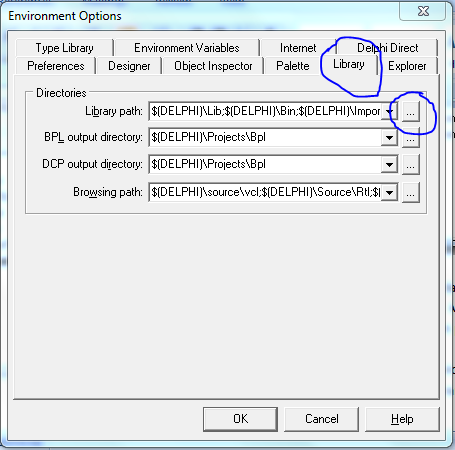
    1. Tambahkan path library dalam Delphi melalui menu Tools | Environtment Options. Cari tab ‘Library’ dan klik tombol builder di sebelah kanan tulisan ‘Library path’
    Setelah muncul jendela ‘Directories’, tambahkan library path dengan cara menekan tombol builder seperti gambar di bawah
    Setelah itu, arahkan dan tambahkan semua folder di dalam folder ZEOSDBO/src/ melalui jendela ‘Browse for Folder’.
    Dengan menambahkan library path dengan langkah di atas, maka Delphi compiler akan mencari file library di dalam folder-folder yang Anda tambahkan tadi.
    2. Copy-kan file libmysql.dll (biasanya ada di folder \ XAMPP\php) ke dalam folder dimana aplikasi Anda berada.
  4. Dari menu File | Open Project, cari file ZeosDbo.bpg .File ini biasanya berada di \ZEOSDBO-6.6.6-stable\packages\delphi7.  File ‘bpg’ merupakan singkatan dari Borland Project Group, jadi beberapa file project dijadikan satu dalam file ini. 
  5. Compile file tersebut melalui menu Project | Compile
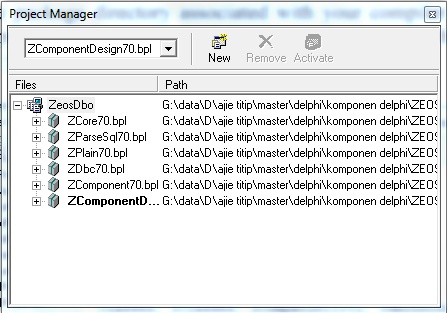
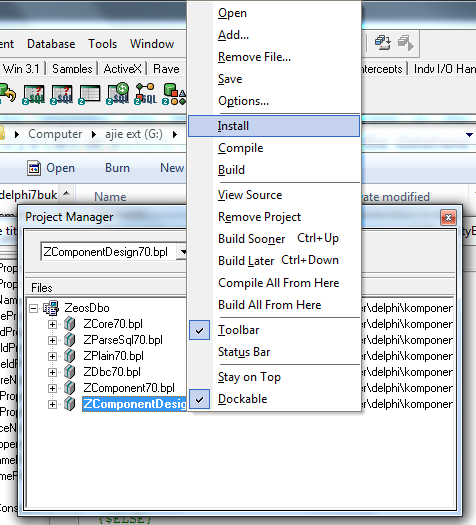
  6. Dan yang terakhir, cari file ZcomponentDesign70.bpl dalam jendela ‘Project Manager’ di atas (biasanya tulisan ZcomponenDesign70.bpl di-bold/cetak tebal). Setelah ketemu, klik kanan file tersebut dan klik ‘Instal’. Beberapa saat kemudian seharusnya muncul jendela yang memberitahukan bahwa komponen-komponen pendukung ZEOS sudah berhasil di instal.
Sampai langkah Anda telah berhasil menginstal komponen ZEOS ke dalam Delphi. Anda bisa mengeceknya dengan cara memastikan tab komponen ‘Zeos Access’ sudah ada di Component Pallete’. 
Demikian cara menginstal komponen ZEOS, semoga bermanfaat, dan jika Anda masih mengalami error, tolong disampaikan dalam comment agar saya bisa melengkapi tutorial di atas.

Best Post This Year

Install Fortesreport community Delphi 7 dan RX Berlin

Download  Pertama2 kita harus punya file installernya terlebih dahulu, download  https://github.com/fortesinformatica/fortesrepo...

Total Pageviews

© 2014 Fajar Priyadi. WP themonic converted by Bloggertheme9. Published By Gooyaabi Templates | Powered By Blogger
TOP