Ads

Ads

Translate

Showing posts with label sql. Show all posts

Monday, 24 August 2015

Mempercepat Pengolahan SQL dengan Array DML

Interbase and Oracle tested

Array DML di FireDAC membantu Anda mengambil keuntungan dari mesin database yang mendukung fitur ini dengan mudah.
 Untuk melihat perbedaan dalam kode dan kecepatan, memungkinkan mengeksplorasi contoh sederhana. Contoh menggunakan tabel berikut disebut tes yang berisi dua bidang, Integer dan String.
CREATE TABLE test(Field1 INTEGER, field2 VARCHAR(20))
Cara khas untuk menyisipkan 10000 catatan adalah dengan menggunakan loop, di mana kita memiliki permintaan yang hanya update parameter dan mengeksekusi SQL.


const
  NUM_INSERTS = 10000;

procedure TForm7.Button1Click(Sender: TObject);
var i: integer; t: integer;
begin
  FDQuery1.ExecSQL('DELETE FROM test');
  FDQuery1.SQL.Text := 'INSERT INTO test(field1, field2) values (:field1, :field2)';
  t := GetTickCount;
  FDQuery1.Connection.StartTransaction;
  try
    for i := 0 to NUM_INSERTS-1 do
    begin
      FDQuery1.Params[0].AsInteger := i;
      FDQuery1.Params[1].AsString := 'Str' + IntToStr(i);
      FDQuery1.ExecSQL;
    end;
  finally
    FDQuery1.Connection.Commit;
  end;
  (Sender as TButton).Caption :=  FloatToStr((GetTickCount() - t) / 1000);
end;

Untuk mengubah kode ini untuk menggunakan Array DML, ada sangat sedikit untuk melakukan.
 Pertama, sebelum menetapkan nilai parameter Anda dapat mengatur ukuran dari array yang ingin Anda masukkan. (Anda selalu dapat mengatur ini lebih tinggi yang diperlukan jika Anda tidak yakin)
Setelah ukuran array diatur, ada sedikit modifikasi dengan cara nilai-nilai parameter yang ditetapkan. FireDAC mendukung setter jamak untuk menetapkan setiap record dalam array dinamis. 
Silahkan rubah kode diatas dengan kode dibawah ini.
procedure TForm7.Button2Click(Sender: TObject);
var i: integer; t: integer;
begin
  FDQuery1.ExecSQL('DELETE FROM test');
  FDQuery1.SQL.Text := 'INSERT INTO test(field1, field2) values (:field1, :field2)';
  t := GetTickCount;
  FDQuery1.Connection.StartTransaction;
  try
    FDQuery1.Params.ArraySize := NUM_INSERTS;
    for i := 0 to NUM_INSERTS-1 do
    begin
      FDQuery1.Params[0].AsIntegers[i] := i;
      FDQuery1.Params[1].AsStrings[i] := 'Str' + IntToStr(i);
    end;
    FDQuery1.Execute(NUM_INSERTS,0);
  finally
    FDQuery1.Connection.Commit;
  end;
  (Sender as TButton).Caption :=  FloatToStr((GetTickCount() - t) / 1000);
end;


Jadi apa perbedaan pada run time? Pada PC saya (mesin virtual), menjalankan 10.000 sisipan mengambil 1,014 detik di blok pertama kode, dibandingkan dengan 0,125 detik dengan blok kedua kode.yaitu hanya 12% dari waktu pemrosesan yang asli dan lebih dari 8 kali lebih cepat!


Yang butuh dvd DelphiXE8 bisa japri saya di 085787677544

Saturday, 15 August 2015

[VIDEO] Make your SQL Server Queries Run Faster

Wednesday, 13 March 2013

Visual Representation of SQL Joins

Introduction

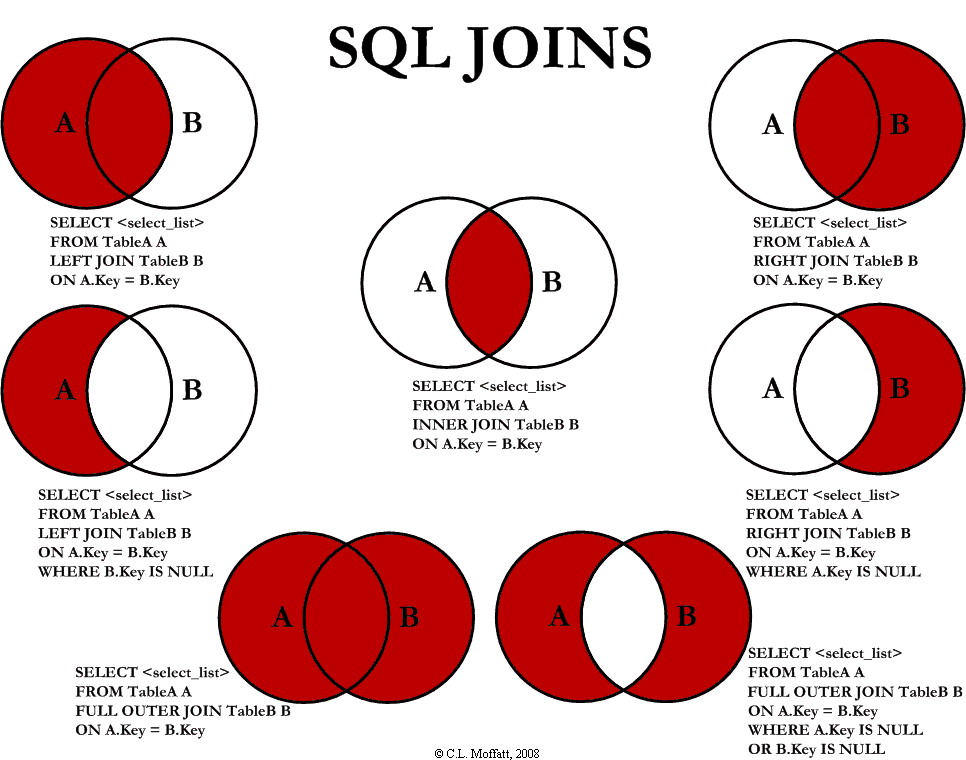
This is just a simple article visually explaining SQL JOINs.

Background

I'm a pretty visual person. Things seem to make more sense as a picture. I looked all over the Internet for a good graphical representation of SQL JOINs, but I couldn't find any to my liking. Some had good diagrams but lacked completeness (they didn't have all the possible JOINs), and some were just plain terrible. So, I decided to create my own and write an article about it.

Using the code

I am going to discuss seven different ways you can return data from two relational tables. I will be excluding cross Joins and self referencing Joins. The seven Joins I will discuss are shown below:
  1. INNER JOIN
  2. LEFT JOIN
  3. RIGHT JOIN
  4. OUTER JOIN
  5. LEFT JOIN EXCLUDING INNER JOIN
  6. RIGHT JOIN EXCLUDING INNER JOIN
  7. OUTER JOIN EXCLUDING INNER JOIN
For the sake of this article, I'll refer to 5, 6, and 7 as LEFT EXCLUDING JOIN, RIGHT EXCLUDING JOIN, and OUTER EXCLUDING JOIN, respectively. Some may argue that 5, 6, and 7 are not really joining the two tables, but for simplicity, I will still refer to these as Joins because you use a SQL Join in each of these queries (but exclude some records with a WHERE clause).

Inner JOIN

INNER_JOIN.png
This is the simplest, most understood Join and is the most common. This query will return all of the records in the left table (table A) that have a matching record in the right table (table B). This Join is written as follows:
SELECT <select_list> 
FROM Table_A A
INNER JOIN Table_B B
ON A.Key = B.Key

Left JOIN

LEFT_JOIN.png
This query will return all of the records in the left table (table A) regardless if any of those records have a match in the right table (table B). It will also return any matching records from the right table. This Join is written as follows:
SELECT <select_list>
FROM Table_A A
LEFT JOIN Table_B B
ON A.Key = B.Key

Right JOIN

RIGHT_JOIN.png
This query will return all of the records in the right table (table B) regardless if any of those records have a match in the left table (table A). It will also return any matching records from the left table. This Join is written as follows:
SELECT <select_list>
FROM Table_A A
RIGHT JOIN Table_B B
ON A.Key = B.Key

Outer JOIN

FULL_OUTER_JOIN.png
This Join can also be referred to as a FULL OUTER JOIN or a FULL JOIN. This query will return all of the records from both tables, joining records from the left table (table A) that match records from the right table (table B). This Join is written as follows:
SELECT <select_list>
FROM Table_A A
FULL OUTER JOIN Table_B B
ON A.Key = B.Key

Left Excluding JOIN

LEFT_EXCLUDING_JOIN.png
This query will return all of the records in the left table (table A) that do not match any records in the right table (table B). This Join is written as follows:
SELECT <select_list> 
FROM Table_A A
LEFT JOIN Table_B B
ON A.Key = B.Key
WHERE B.Key IS NULL

Right Excluding JOIN

RIGHT_EXCLUDING_JOIN.png
This query will return all of the records in the right table (table B) that do not match any records in the left table (table A). This Join is written as follows:
SELECT <select_list>
FROM Table_A A
RIGHT JOIN Table_B B
ON A.Key = B.Key
WHERE A.Key IS NULL

Outer Excluding JOIN

OUTER_EXCLUDING_JOIN.png
This query will return all of the records in the left table (table A) and all of the records in the right table (table B) that do not match. I have yet to have a need for using this type of Join, but all of the others, I use quite frequently. This Join is written as follows:
SELECT <select_list>
FROM Table_A A
FULL OUTER JOIN Table_B B
ON A.Key = B.Key
WHERE A.Key IS NULL OR B.Key IS NULL

Examples

Suppose we have two tables, Table_A and Table_B. The data in these tables are shown below:
TABLE_A
  PK Value
---- ----------
   1 FOX
   2 COP
   3 TAXI
   6 WASHINGTON
   7 DELL
   5 ARIZONA
   4 LINCOLN
  10 LUCENT

TABLE_B
  PK Value
---- ----------
   1 TROT
   2 CAR
   3 CAB
   6 MONUMENT
   7 PC
   8 MICROSOFT
   9 APPLE
  11 SCOTCH
The results of the seven Joins are shown below:
-- INNER JOIN
SELECT A.PK AS A_PK, A.Value AS A_Value,
       B.Value AS B_Value, B.PK AS B_PK
FROM Table_A A
INNER JOIN Table_B B
ON A.PK = B.PK

A_PK A_Value    B_Value    B_PK
---- ---------- ---------- ----
   1 FOX        TROT          1
   2 COP        CAR           2
   3 TAXI       CAB           3
   6 WASHINGTON MONUMENT      6
   7 DELL       PC            7

(5 row(s) affected)
-- LEFT JOIN
SELECT A.PK AS A_PK, A.Value AS A_Value,
B.Value AS B_Value, B.PK AS B_PK
FROM Table_A A
LEFT JOIN Table_B B
ON A.PK = B.PK

A_PK A_Value    B_Value    B_PK
---- ---------- ---------- ----
   1 FOX        TROT          1
   2 COP        CAR           2
   3 TAXI       CAB           3
   4 LINCOLN    NULL       NULL
   5 ARIZONA    NULL       NULL
   6 WASHINGTON MONUMENT      6
   7 DELL       PC            7
  10 LUCENT     NULL       NULL

(8 row(s) affected)
-- RIGHT JOIN
SELECT A.PK AS A_PK, A.Value AS A_Value,
B.Value AS B_Value, B.PK AS B_PK
FROM Table_A A
RIGHT JOIN Table_B B
ON A.PK = B.PK

A_PK A_Value    B_Value    B_PK
---- ---------- ---------- ----
   1 FOX        TROT          1
   2 COP        CAR           2
   3 TAXI       CAB           3
   6 WASHINGTON MONUMENT      6
   7 DELL       PC            7
NULL NULL       MICROSOFT     8
NULL NULL       APPLE         9
NULL NULL       SCOTCH       11

(8 row(s) affected)
-- OUTER JOIN
SELECT A.PK AS A_PK, A.Value AS A_Value,
B.Value AS B_Value, B.PK AS B_PK
FROM Table_A A
FULL OUTER JOIN Table_B B
ON A.PK = B.PK

A_PK A_Value    B_Value    B_PK
---- ---------- ---------- ----
   1 FOX        TROT          1
   2 COP        CAR           2
   3 TAXI       CAB           3
   6 WASHINGTON MONUMENT      6
   7 DELL       PC            7
NULL NULL       MICROSOFT     8
NULL NULL       APPLE         9
NULL NULL       SCOTCH       11
   5 ARIZONA    NULL       NULL
   4 LINCOLN    NULL       NULL
  10 LUCENT     NULL       NULL

(11 row(s) affected)
-- LEFT EXCLUDING JOIN
SELECT A.PK AS A_PK, A.Value AS A_Value,
B.Value AS B_Value, B.PK AS B_PK
FROM Table_A A
LEFT JOIN Table_B B
ON A.PK = B.PK
WHERE B.PK IS NULL

A_PK A_Value    B_Value    B_PK
---- ---------- ---------- ----
   4 LINCOLN    NULL       NULL
   5 ARIZONA    NULL       NULL
  10 LUCENT     NULL       NULL
(3 row(s) affected)
-- RIGHT EXCLUDING JOIN
SELECT A.PK AS A_PK, A.Value AS A_Value,
B.Value AS B_Value, B.PK AS B_PK
FROM Table_A A
RIGHT JOIN Table_B B
ON A.PK = B.PK
WHERE A.PK IS NULL

A_PK A_Value    B_Value    B_PK
---- ---------- ---------- ----
NULL NULL       MICROSOFT     8
NULL NULL       APPLE         9
NULL NULL       SCOTCH       11

(3 row(s) affected)
-- OUTER EXCLUDING JOIN
SELECT A.PK AS A_PK, A.Value AS A_Value,
B.Value AS B_Value, B.PK AS B_PK
FROM Table_A A
FULL OUTER JOIN Table_B B
ON A.PK = B.PK
WHERE A.PK IS NULL
OR B.PK IS NULL

A_PK A_Value    B_Value    B_PK
---- ---------- ---------- ----
NULL NULL       MICROSOFT     8
NULL NULL       APPLE         9
NULL NULL       SCOTCH       11
   5 ARIZONA    NULL       NULL
   4 LINCOLN    NULL       NULL
  10 LUCENT     NULL       NULL

(6 row(s) affected)
Note on the OUTER JOIN that the inner joined records are returned first, followed by the right joined records, and then finally the left joined records (at least, that's how my Microsoft SQL Server did it; this, of course, is without using any ORDER BY statement).
You can visit the Wikipedia article for more info here (however, the entry is not graphical).
I've also created a cheat sheet that you can print out if needed. If you right click on the image below and select "Save Target As...", you will download the full size image.

History

  • Initial release -- 02/03/2009.
  • Version 1.0 -- 02/04/2009 -- Fixed cheat sheet and minor typos.

License

This article, along with any associated source code and files, is licensed under The Code Project Open License (CPOL)

About the Author

C.L. Moffatt

Best Post This Year

Install Fortesreport community Delphi 7 dan RX Berlin

Download  Pertama2 kita harus punya file installernya terlebih dahulu, download  https://github.com/fortesinformatica/fortesrepo...

Total Pageviews

© 2014 Fajar Priyadi. WP themonic converted by Bloggertheme9. Published By Gooyaabi Templates | Powered By Blogger
TOP